VPS利用のためWebARENA Indigoを使用してみる その2
WebARENAの初期構築について書いた。
VPS利用のためWebARENA Indigoを使用してみる
その続き。
目的はRustDeskのサーバとして整えること。
その途中でVPSサーバが正常に使えることが必須であったため、ちょっと記事をひとつ挟んでおく。
WebARENA+ubuntu用として、ChatGPTに聞くと下記の手順を示された。
Step 1 WebARENA側のVPSを確認
Step 2 Ubuntuの初期確認・アップデート
Step 3 Dockerをインストール
Step 4 RustDesk Serverの配置・設定
Step 5 RustDesk Serverの起動・動作確認
Step 6 RustDeskクライアントを自前サーバーへ接続
Step 7 運用設定・最終確認
今回はStep 1とStep2について書く。
Step 1 WebARENA側のVPSを確認
下記を確認
・OS
・グローバルIPがわかっていること。
・ssh接続ができていること。
これらは前回確認できている。
Step 2 Ubuntuの初期確認・アップデート
Step 1との重複もあるが、
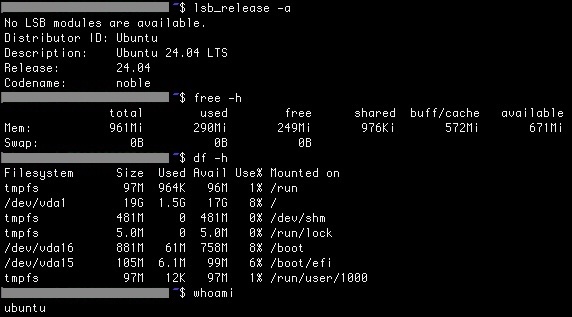
(1)OSとバージョン確認
$ lsb_release -a
No LSB modules are available.
Distributor ID: Ubuntu
Description: Ubuntu 24.04 LTS
Release: 24.04
Codename: noble
(2)CPU・メモリ確認
$ free -h
total used free shared buff/cache available
Mem: 961Mi 290Mi 249Mi 976Ki 572Mi 671Mi
Swap: 0B 0B 0B
(3)ディスク容量確認
$ df -h
Filesystem Size Used Avail Use% Mounted on
tmpfs 97M 964K 96M 1% /run
/dev/vda1 19G 1.5G 17G 8% /
tmpfs 481M 0 481M 0% /dev/shm
tmpfs 5.0M 0 5.0M 0% /run/lock
/dev/vda16 881M 61M 758M 8% /boot
/dev/vda15 105M 6.1M 99M 6% /boot/efi
tmpfs 97M 12K 97M 1% /run/user/1000
(4)現在のユーザー確認
$ whoami
ubuntu
(5)時刻とタイムゾーン
現在の確認
$ date
Sat Sep 19 22:00:27 UTC 2026
$ timedatectl
Local time: Sat 2026-09-19 22:02:45 UTC
Universal time: Sat 2026-09-19 22:02:45 UTC
RTC time: Sat 2026-09-19 22:02:45
Time zone: Etc/UTC (UTC, +0000)
System clock synchronized: yes
NTP service: active
RTC in local TZ: no
UTCになっているので、タイムゾーンをTokyoに変更する。
$ sudo timedatectl set-timezone Asia/Tokyo
変更されたかどうか確認
$ date
Sun Sep 20 07:05:37 JST 2026
$ timedatectl
Local time: Sun 2026-09-20 07:05:47 JST
Universal time: Sat 2026-09-19 22:05:47 UTC
RTC time: Sat 2026-09-19 22:05:47
Time zone: Asia/Tokyo (JST, +0900)
System clock synchronized: yes
NTP service: active
RTC in local TZ: no
(6)アップデート確認
$ sudo apt update
Hit:1 http://security.ubuntu.com/ubuntu noble-security InRelease
Hit:2 http://archive.ubuntu.com/ubuntu noble InRelease
Get:3 http://archive.ubuntu.com/ubuntu noble-updates InRelease [126 kB]
Hit:4 http://archive.ubuntu.com/ubuntu noble-backports InRelease
Get:5 http://archive.ubuntu.com/ubuntu noble-updates/main amd64 Packages [1275 kB]
Fetched 1401 kB in 2s (597 kB/s)
Reading package lists... Done
Building dependency tree... Done
Reading state information... Done
343 packages can be upgraded. Run 'apt list --upgradable' to see them.
パッケージリストの更新完了。
(7)アップグレード実施
$ sudo apt upgrade
Processing triggers for libc-bin (2.39-0ubuntu8.9) ...
Scanning processes... Scanning candidates... Scanning linux images...
Pending kernel upgrade!
Running kernel version:
6.8.0-31-generic
Diagnostics:
The currently running kernel version is not the expected kernel version 6.8.0-139-generic.
Restarting the system to load the new kernel will not be handled automatically, so you should consider rebooting.
Restarting services...
systemctl restart cron.service
Service restarts being deferred:
/etc/needrestart/restart.d/dbus.service
systemctl restart getty@tty1.service
systemctl restart serial-getty@ttyS0.service
systemctl restart systemd-logind.service
systemctl restart unattended-upgrades.service
No containers need to be restarted.
User sessions running outdated binaries:
ubuntu @ session #34: apt[2915], sshd[2215,2313]
ubuntu @ user manager service: systemd[1873]
No VM guests are running outdated hypervisor (qemu) binaries on this host.
アップグレードは正常に終了。
注意すべきは、
「インストールした6.8.0-139-generic.ではなく、古い6.8.0-31-genericが動いている。
新しいカーネルを読み込むには再起動をしなさい。」
的なことですね。
一応、カーネルバージョンを調べる。
$ uname -r
6.8.0-31-generic
古いまま。
再起動をかける。
$ sudo shutdown -r now
たいして時間がかからず再起動でき、再度ssh接続してカーネルバージョンを再確認。
$ uname -r
6.8.0-139-generic
これでアップグレードが完了。
ここまでで、RustDeskサーバとして使用するためのVPSサーバのセットアップが完了。
RustDesk関係なくても、OSアップデートは必須だったかな。
次はDockerの話などを書く。