.jpg画像の保存に回転情報が含まれていることを知った
縦長画像をVBAでエクセルに挿入したら、縦横長がおかしくなり横に伸びてしまった。
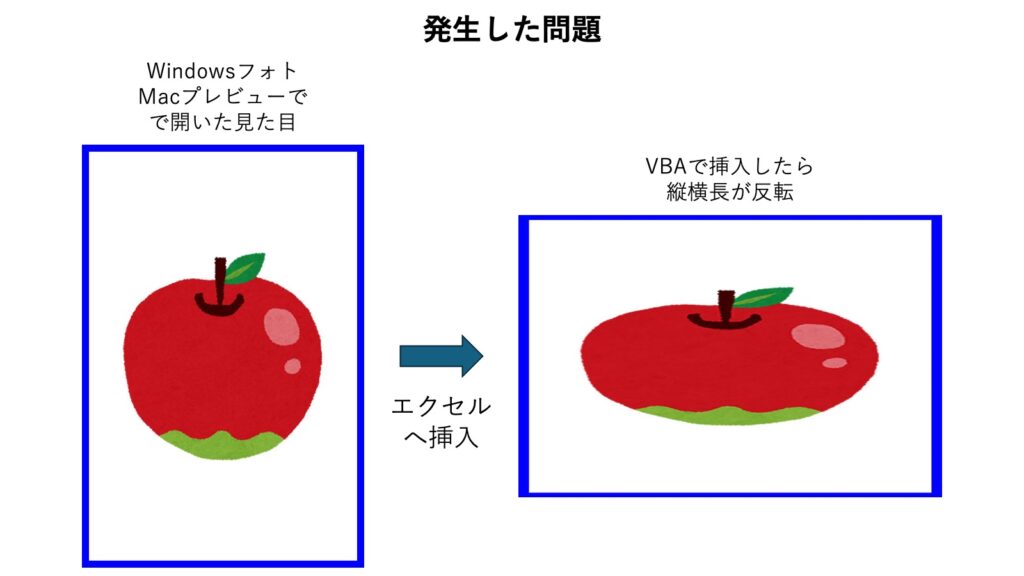
VBAでは元画像の幅と高さを取得して、縦横比を維持して縮小してするような処理をしている。
最初はなぜ横に伸びているのかわからず。
VBEでトレースすると、思っていたのとは違い幅600 x 高さ400という感じで横長の状態のデータが保存されていることがわかった。ここでハテナ?
結論としては、縦長に見える画像でも実際には横長に保存されていて、回転情報が付加されていることがあるということ。
これは知らなかった。
確かに、これまでもなにかの機会にアプリやWebサイトへの画像貼り付けで画像の向きがおかしくなったとこがあったような。関係ありそう。
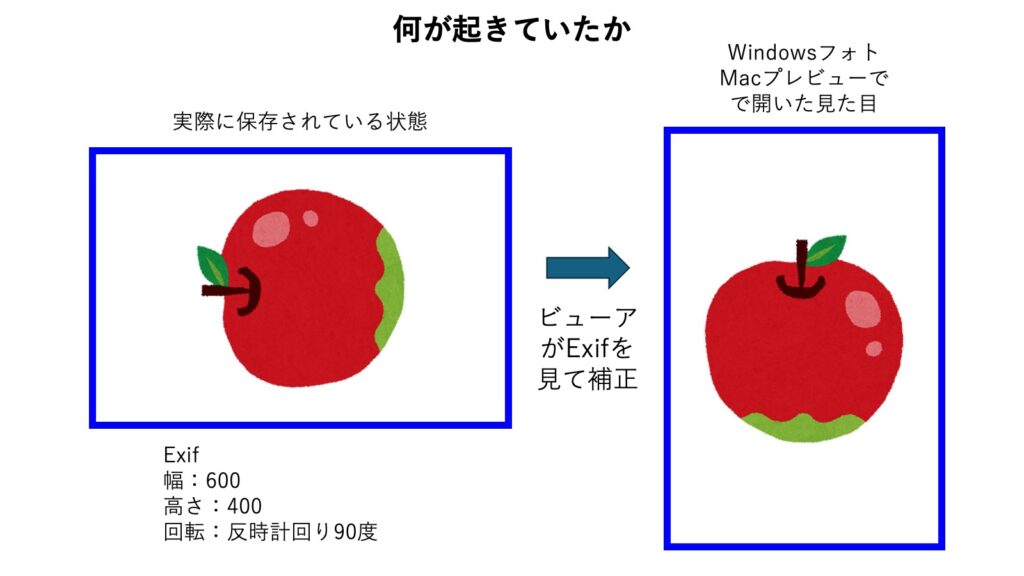
Exif(イグジフ)に、露出やF値などの撮影設定以外に、回転情報 Orientation という情報が入っているらしい。
カメラなど撮影機材の仕様で、撮影時の角度と向きをジャイロセンサーがキャッチしているのかな?
ビューアはOrientationの値を見て、回転を元に戻してから表示しているとのこと。
一方VBAではそんなことは知らず、回転情報は見ずに縦横幅しか見ていなかったためこんな問題に出会ったわけだ。
Macでjpgの情報を参照した例)
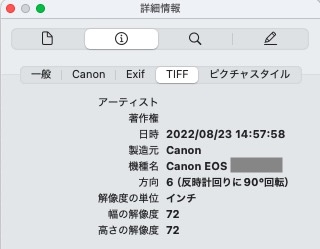
6が反時計回りに90°回転、8が反時計回りに270°回転、3が180°回転、1はそのままという具合だ。
レアケースとして、5や7の反転もある。
OrientationはWindowsのプロパティでは見ることができなかった。
つまり、VBA側で考慮不足(というか知らなかった)ことが原因。
Orientation(方向)の90°と270°だけを考慮して縦長と横長を取得するサンプル)
Sub ボタン1_Click()
    Dim productImageFileName As String
    Dim pic As Object
    Dim w As Long, h As Long, ori As Integer

    productImageFileName = "c:\abc.jpg"

    ' 画像の幅、高さを取得する
    Set pic = LoadPicture(productImageFileName)
    w = CLng(pic.width * 0.0378)
    h = CLng(pic.height * 0.0378)

    Debug.Print "▼オリジナル"
    Debug.Print "幅=" & w
    Debug.Print "高さ=" & h

    Dim result As Variant
    result = GetImageSizeWithOrientation(productImageFileName)

    w = result(0)
    h = result(1)
    ori = result(2)

    Debug.Print "▼回転考慮"
    Debug.Print "幅=" & w
    Debug.Print "高さ=" & h
    Debug.Print "Orientation=" & ori

End Sub

Function GetImageSizeWithOrientation(filePath As String) As Variant

    Dim img As Object
    Set img = CreateObject("WIA.ImageFile")
    img.LoadFile filePath

    Dim width As Long
    Dim height As Long
    width = img.width
    height = img.height

    Dim orientation As Integer
    orientation = 1 ' デフォルト(回転なし)

    Dim prop As Object
    For Each prop In img.Properties
        If prop.PropertyID = 274 Then ' Orientation
            orientation = prop.Value
            Exit For
        End If
    Next

    ' Orientationに応じて補正
    Select Case orientation
        Case 6, 8 ' 90度 or 270度回転
            Dim tmp As Long
            tmp = width
            width = height
            height = tmp
    End Select

    GetImageSizeWithOrientation = Array(width, height, orientation)

End Function
実行結果の例)
▼オリジナル
幅=600
高さ=400
▼回転考慮
幅=400
高さ=600
Orientation=6
もう一つ、特定フォルダ内にたくさんあるjpgファイルの中から Orientation が設定された画像をリストするスクリプトを検討する。(ChatGPTに聞きながら)
PowerShellスクリプト)ファイル名:CheckOrientationJpg.ps1
$folder = "C:\images"

Add-Type -AssemblyName System.Drawing

Get-ChildItem $folder -Recurse | Where-Object {
    $_.Extension -match '\.jpe?g$'
} | ForEach-Object {

    try {
        $img = [System.Drawing.Image]::FromFile($_.FullName)

        if ($img.PropertyIdList -contains 274) {
            $orientation = $img.GetPropertyItem(274).Value[0]

            if ($orientation -in 6,8) {
                [PSCustomObject]@{
                    FilePath   = $_.FullName
                    Orientation = $orientation
                    Width      = $img.Width
                    Height     = $img.Height
                }
            }
        }

        $img.Dispose()
    } catch {
        $msg = "読み込み失敗:" + $_.Exception.Message
        Write-Warning $msg
    }
} | Format-List
PropertyID 274がOrientationとのこと。
そして、PowerShellを実行するバッチ)ファイル名:CheckOrientationJpg.bat
@echo off
powershell -ExecutionPolicy Bypass -File "%~dp0CheckOrientationJpg.ps1"
pause
実行結果は下記のような感じ。
FilePath : C:\images\1.jpg
Orientation : 6
Width : 120
Height : 80
FilePath : C:\images\2.jpg
Orientation : 8
Width : 120
Height : 80